Skip to content
LLIMAGER - LLSmartVerify Documentation
Targeted Acquisition Log Sample
Initializing search
Home
LLIMAGER
LLIMAGER-Win
LLIMAGER Companion Mobile App
LLSmartVerify
LLIMAGER - LLSmartVerify Documentation
Home
LLIMAGER
LLIMAGER
Preface
Release Notes
Terminology
Supported Mac Hardware
Before You Start
Requirements
Installation / Getting Started with LLIMAGER
Full File System
Targeted
Targeted - Using Filtering
Time Machine
Acquire Profiles
Convert (Sparse to DMG)
Hash (Calculate Cryptographic Hash Value)
Send To Cloud
Acquisition Log Sample
Targeted Acquisition Log Sample
Changelog
Troubleshooting
EULA
Privacy Policy
Support & Feedback
LLIMAGER-Win
LLIMAGER-Win
Preface
Licensing
Terminology
Supported Hardware
LLimager installer
Before You Start
Requirements
Installation / Getting Started
Disk Image
Targeted Collection
Dead Box Imaging (Linux Boot)
Dead Box in the field
Convert / Hash
Send to Cloud
Verify & Anchor Images
Acquisition Log Sample
Troubleshooting
EULA
Privacy Policy
Support & Feedback
LLIMAGER Companion Mobile App
LLIMAGER Companion Mobile App
Overview
Installation & First Launch
Scanning the QR Code
Viewing Verification Results
Offline Behavior
EULA
Privacy Policy
LLSmartVerify
LLSmartVerify
Overview
User Management
Licensed Users Dashboard
Transaction Details
Blockchain Details
EULA
Privacy Policy
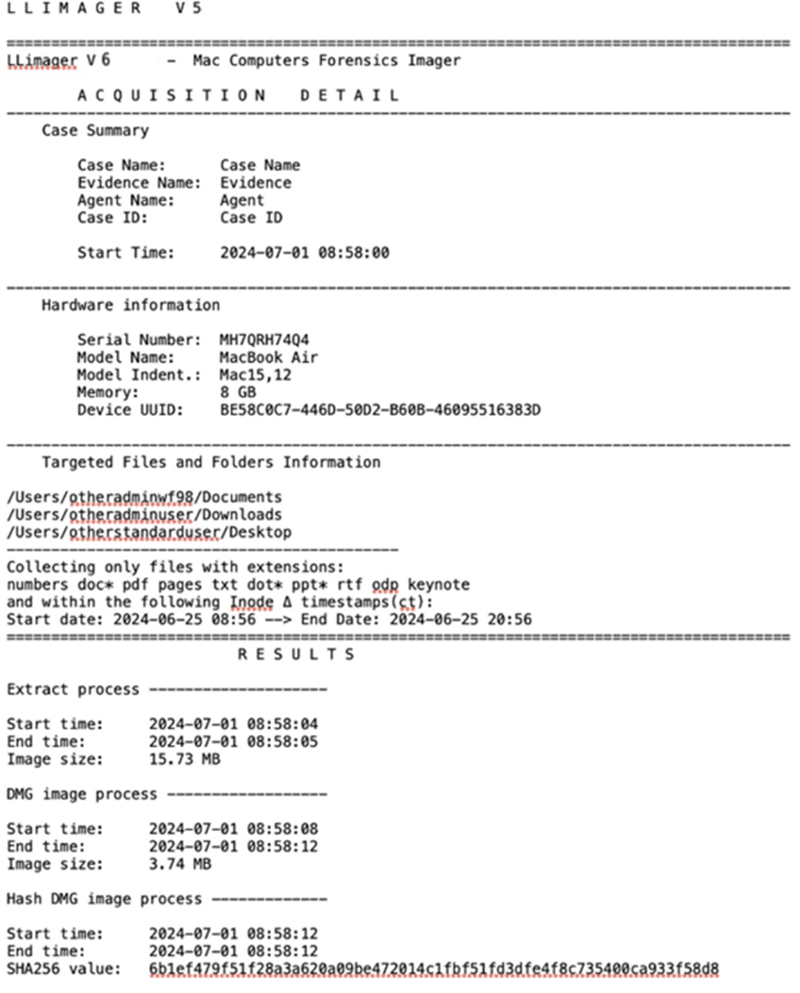
Targted Acquisition Log Sample

The following is a sample of the targeted folders acquisition log.
Back to top