Terminology
Sparse image file: a native macOS image format that is dynamic and used within the Mac environment. The file grows as data is added to the image, taking up only as much disk space as stored in it.
DMG file: a native macOS disk image format like the sparse image but less versatile. It is used primarily to distribute software to Mac users. It is more compatible with other commercial software and can be imported into any modern forensic applications.
Device Identifier (ID): the term used herein refers to the unique identifier used by the operating system to identify a mounted storage device with a disk number (disk1, disk1s1, etc.). This can be located using the Disk Utility as seen highlighted in the following picture.
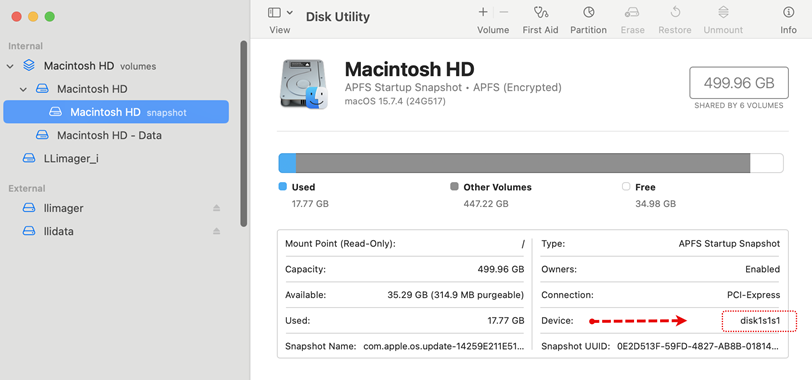
USB Label / Name: This is the name of a mounted partition, physical or virtual. It can be found using Finder, on the left side of the window. Note that a disk can have more than one partition, hence, each partition will be mounted with its own name.
LLIMAGER USB Drive: This is a USB drive with the two DMG files containing the executable file of the same name, and the license key file. The executable is “llimager.app”.